GreenWeka
Green Weka captures your mobile calls, emails and voice notes and puts them into Simpro where the job lives. Keep your own number and telco; incoming and outgoing calls are captured with no extra hardware. Every conversation is matched to the customer and job, then written to Simpro as a job note, a new lead or a task. Ask the assistant about today’s schedule, open quotes and leads, by voice or chat.
Description
What Green Weka does for Simpro
Green Weka puts your mobile calls, emails and site notes into Simpro, as notes on the job, new leads and tasks, with nothing to type and no change to your number. It connects directly to Simpro as a Simpro Technology Partner: no desk phone system, no integration hub in the middle, no extra vendor.
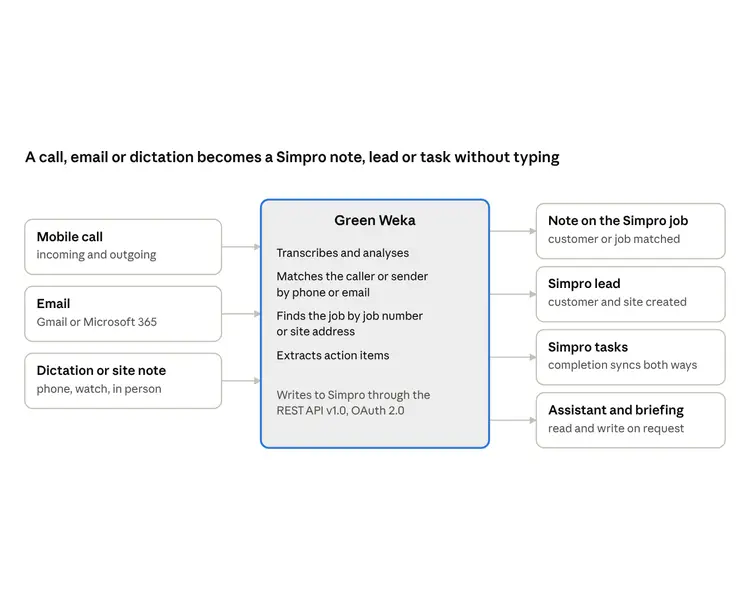
Keep your own mobile number and telco. Incoming and outgoing calls are captured, transcribed and analysed, with no extra hardware and no change to the number people see. Emails from Gmail or Microsoft 365 and voice notes dictated on your phone, watch or in person are handled the same way.
What lands in Simpro
For every call, email or dictation, Green Weka matches the customer by phone or email, finds the job by job number or site address, and writes a note on the Simpro job. New enquiries become Simpro leads, with the customer and site created for you. Action items become Simpro tasks, and marking one done in either system updates the other.
Ask, don’t search
Ask the Green Weka assistant anything about your Simpro work: today’s schedule, what’s waiting to be quoted, which leads need a follow-up. It reads and writes on request, by voice or chat, and gives you a morning briefing covering your jobs, quotes, leads and tasks.
Connecting takes a minute
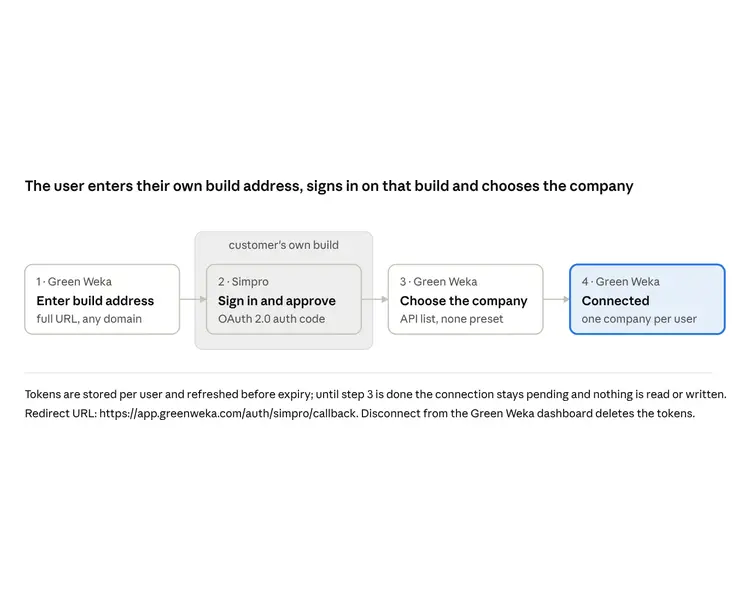
Enter your Simpro web address, sign in to Simpro, choose your company. Works on any Simpro build, with any number of companies. Green Weka connects through the Simpro API using OAuth 2.0; your Simpro login details are never stored.
Marketplace Products
Media
Reviews
FAQ
It captures your mobile calls, emails and voice notes, matches each one to the Simpro customer and job, and writes the result back: a note on the job, a new lead for a fresh enquiry, or a task for an action item. Tasks sync both ways when marked done.
Any Simpro build. You enter your own Simpro web address when connecting, sign in to Simpro, and choose the company to link. Multi-company builds are supported.
No. You sign in on Simpro’s own page and approve the connection; Green Weka receives an access token, never your password. You can disconnect at any time.
Green Weka is priced per user per month with a free trial, and the Simpro connection is included at no extra charge. Current plans are at greenweka.com/plans.